


Beyond PayPal and WorldPay pay links
Use Clarity Payment Hub for Business Central payment processing and tie card and ACH payments to invoices, sales orders and counter sales inside your existing Business Central footprint.
Payments post back to the customer ledger, and core installations go live in about 48 hours.
Dynamics 365 Business Central runs small and mid-sized distributors, manufacturers and services firms, and it is where Microsoft points Dynamics GP customers next. Its built-in Payment Services add PayPal Payments Standard links to emailed sales documents (the WorldPay extension is deprecated). Integrating Payment Hub with Business Central adds the rest of the receivables side:
Collections and cash application inside Business Central
AR automationStaff take a payment during a customer call or send a pay-now link without leaving Business Central, and the link rides on the printed and emailed invoices customers already open.
Cash application and payment reconciliationPayments post against posted sales invoices on the customer ledger, payment on account applies to open invoices oldest-first, and card activity writes journal entries for authorization and settlement.
One payment, posted to Business Central
- PAY-NOW LINKOn the emailed invoice
- PAYMENTCard or ACH
- CUSTOMER LEDGERApplied to posted sales invoices
- JOURNAL ENTRIESAuthorization and settlement
Consolidated payments, sales orders and split shipments
B2B payments for distributors and manufacturersConsolidated payment across many invoices, payment on the sales order itself, and automatic reauthorization when a split shipment ships, with headroom for freight adjustments.
Credit card processing fees and surchargingA disclosed surcharge on credit card payments taken in Business Central, where the state and card networks allow it. Debit cards are never surcharged.
A split shipment, end to end
- SALES ORDERPayment taken on the order
- SHIPMENT 1Captured
- SHIPMENT 2Reauthorized when it ships
- SURCHARGEDisclosed where rules allow
A portal with invoices, saved cards and reorders
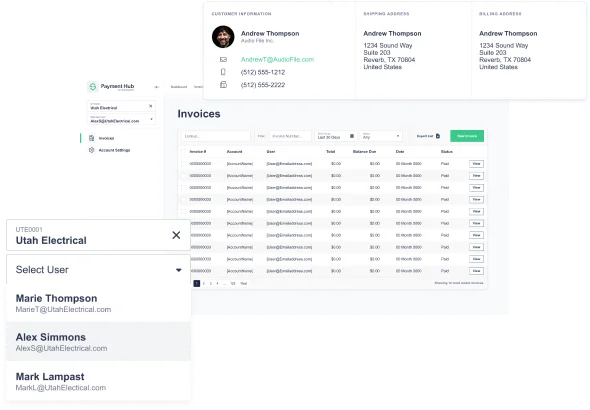
Customer payment portalCustomers see their Business Central invoices and payment history, pay with saved cards and reorder from past orders.
ACH paymentsACH beside cards on the portal and pay-now links, posting back to Business Central the same way.
Lower card costs on B2B cards
Level 2 and Level 3 interchangeLevel III line-item data from the Business Central transaction goes with every eligible B2B card payment, and counter and eCommerce payments reconcile against the same records.
Visa CEDPVisa's Commercial Enhanced Data Program grades commercial card payments on that line data. Since Visa's April 18, 2026 schedule, failed data earns the same rate as none and the criteria aren't published, so the data comes from Business Central's own invoice lines.
Card cost controls
- COMMERCIAL CARDLevel III from Business Central invoice lines
- VISA CEDPLine-item data validated
- DEBIT CARDNever surcharged
Dynamics 365 Business Central Payment Processing with Clarity Payment Hub: core functionality
Clarity Payment Hub offers packaged-priced Dynamics 365 Business Central payment integration for teams that need full credit card processing without the cost and effort of a custom build. The hub embeds inside the existing Dynamics 365 Business Central footprint, ties card processing to invoices and counter sales in one place for reconciliation, and cuts the redundant data entry these back-office processes rely on today. Most core installations stand up within 48 hours of our team receiving credentials to a Business Central sandbox. Extended features are available where needed and may carry additional configuration cost.
| Feature | What it does | Status |
|---|---|---|
| Click-to-Pay | Email a secure link from the customer card or a posted invoice; the customer pays on a hosted Clarity page and the card number never enters Business Central. | Standard / Included |
| Sales Invoice Payments | Charge a card or ACH account against a posted sales invoice, and the payment applies to its open customer ledger entry. | Standard / Included |
| Customer Collections | Collect on open customer ledger entries during a call, or send a pay link, from inside Business Central. | Standard / Included |
| Automatic Reauthorizations | When a sales order ships in parts, each shipment gets a fresh authorization on the original card, so the customer isn't asked again. | Standard / Included |
| Tokenization | The card is swapped for a token at the gateway when it's swiped or keyed; Business Central and every later charge only see the token. | Standard / Included |
| Payment Reconciliation | Authorizations and settlements create the journal entries in Business Central, so there's no processor statement to rekey. | Standard / Included |
| Invoice Collection on Reports | A pay-now link prints on the Business Central invoice layout and rides along in the emailed PDF, so customers pay from the document. | Standard / Included |
| Confirmation Receipts | The customer gets a branded email receipt as soon as the payment clears, listing the invoices it paid. | Standard / Included |
| Customer Payment Portal | Buyers log in to see their Business Central open invoices and payment history, pay with saved cards and reorder past items. | Standard / Included |
| Overages | Authorize a little above the order total so freight and small changes on a long-running sales order don't need a second charge. | Standard / Included |
| Consolidated Payments | One payment can settle several open invoices; it's split across the matching customer ledger entries. | Standard / Included |
| Payment on Account | An unallocated payment is applied to the customer's oldest open entries first, with no manual matching in Apply Entries. | Standard / Included |
| Counter Sales | A card-present terminal at the counter posts the payment to the same sales order in Business Central, so nothing is entered twice. | Partially Included |
| Surcharging | Add a disclosed surcharge to credit card payments where state law and card-network rules allow it; debit cards are excluded. | Partially Included |
| Ecommerce Integration | Online store payments run on the same merchant account as the counter and reconcile against the same Business Central customers and orders. | Partially Included |
| Level III Processing | Send line items, tax and customer codes from the Business Central invoice with each eligible commercial card payment. | Partially Included |
| Sales Order Payments | Take a deposit or full payment on the sales order before it ships, as part of order-to-cash. | Partially Included |
Partially Included features may require additional configuration or services.
See it running against your Business Central sandbox
A walkthrough of a sandbox install against your Business Central environment: pay-now links, consolidated payments and posting to the customer ledger.
Other ERPs
Every ERP Payment Hub works with is on the ERP payment processing page.
Ready to simplify payments for Dynamics 365 Business Central?
Clarity Payment Hub gives Dynamics 365 Business Central merchants a single point for payment processing across invoices, counter sales, and ecommerce, and the operational savings that come from eliminating redundant data entry between the payment processor and the ERP. Customer experience improves because saved tokens, faster checkout, and a branded portal feel like one product rather than a bolt-on. Request a demo and we will walk through a sandbox install against your Dynamics 365 Business Central environment.
Book a Live Demo