


What AR collections automation actually replaces
Stop wasting time chasing "your" money. The manual collections cycle consumes most of an AR team's week. Printing and emailing invoices, answering "where is my invoice?" and "what's my balance?" calls, running aging reports, working exception queues by hand, sending dunning reminders on a staff-maintained schedule, taking card and ACH payments over the phone, rekeying receipts into the ERP, reconciling cash at month-end. Almost every step of that cycle is mechanical — and almost every step of that cycle is something Clarity Payment Hub automates.
Before Payment Hub
Manual collections cycle
- AR emails or prints invoices one at a time
- Customers call to ask "what do I owe?" and "can you resend invoice 12345?"
- AR runs aging reports in the ERP to figure out who to chase
- Dunning reminders sent manually on a staff-maintained spreadsheet
- Phone-in card payments keyed into a virtual terminal and then into the ERP
- Net 30 means 30 days of waiting plus the chase calls on day 31, 35, 45
- Month-end cash reconciliation takes days of AR time
- Disputes and short-pays tracked in spreadsheets or email
With Payment Hub
Automated collections cycle
- Invoices sync to the branded portal the moment they post to the ERP
- Customers self-serve invoice lookup, aging, balance, receipts — 24/7
- Payment Hub runs aging and surfaces only exceptions to AR
- Automated dunning on your schedule with branded emails + pay-by-link
- Tokenized one-click payment by card, ACH, or wallet — no rekeying
- Net 30 converts to authorized ACH auto-debit on the due date
- Cash receipts post in real time — month-end reconciliation is hours, not days
- Disputes and short-pays captured in the portal with audit trail to the ERP
The shift isn't "AR people work harder" or "replace AR with software." It's stop your AR team from doing the mechanical work that software should be doing, and free their time for the exception-handling, relationship, and analysis work that actually moves the business.
How Payment Hub automates the AR cycle
So what's included that helps our processes? Eight capabilities are doing the heavy lifting. Each one replaces a manual step your AR team is running today.
Portal Screenshot
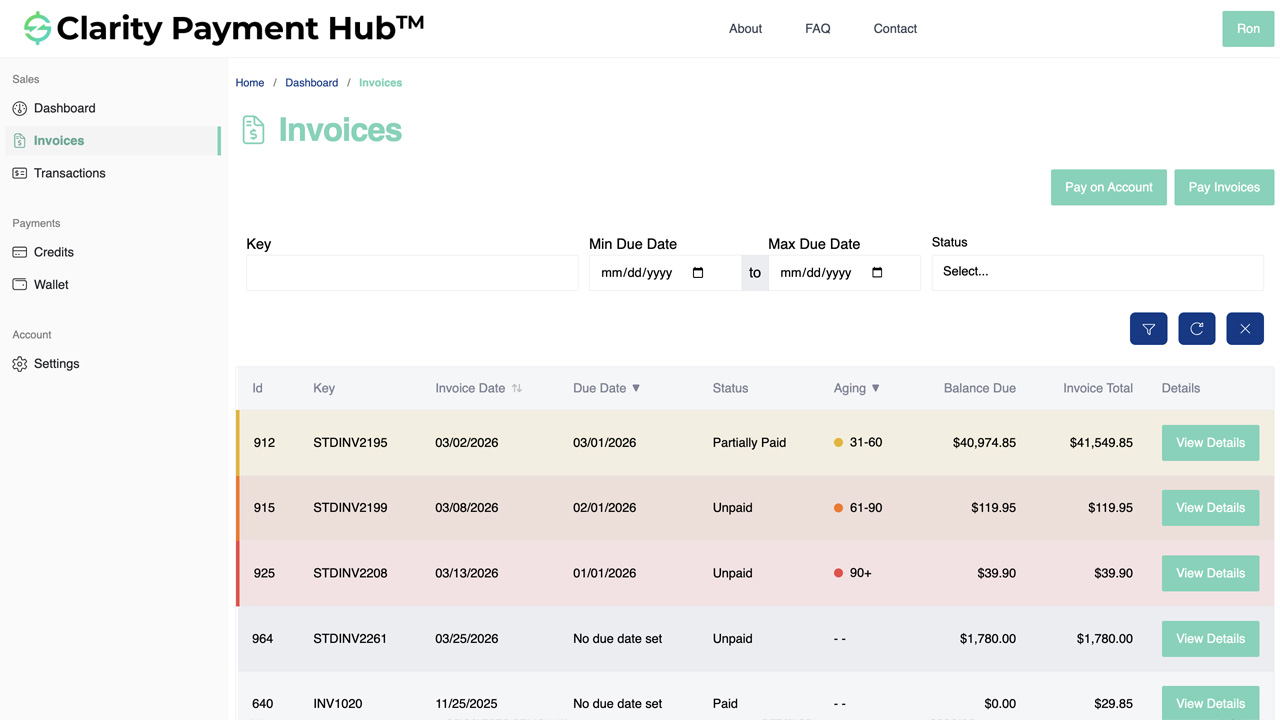
- Branded self-service portalCustomers log in to your URL under your brand to see open invoices, aging, credits, payment history, and receipts. 24/7 mobile-first. Replaces inbound balance-inquiry and invoice-copy calls almost entirely.
- Automated dunning (email + SMS)Scheduled reminder cadence you configure per segment — pre-due, due, past-due at 3 / 10 / 30 / 60 days. Branded templates, open / click tracking, and escalation routing when a customer doesn't respond.
- Single-use signed pay-by-linkEvery dunning email carries a deep-link that opens the portal pre-authenticated at the specific invoice. Customer clicks, authorizes with saved card / ACH, payment posts. A short path from email open to paid.
- Tokenized one-click paymentSaved cards and bank accounts live in the gateway's PCI vault, not on your infrastructure. Repeat customers re-pay in one click. Raw card numbers never touch Payment Hub or your servers; they stay tokenized at the gateway.
- ACH auto-debit for Net termsReplace Net 30 with authorized tokenized ACH auto-debit on the due date. Customer keeps the 30-day timing; you eliminate the chase cycle, DSO drops, write-offs fall. Nacha authorization capture handled automatically.
- Configurable payment plansPublish plan offers (3-month, 6-month, 12-month) with rules you define. Customers self-select plans from the portal, authorize recurring, and the ERP reflects the plan balance with scheduled dates. AR only sees requests outside policy.
- Collections worklist & aging dashboardAR sees only the accounts that actually need attention — dunning-unresponsive, disputed, past payment-plan lapse, high-exposure. Aging buckets by 30/60/90/120+, sortable by amount, with one-click drill to customer detail and action buttons.
- Real-time ERP postingEvery cash receipt, credit application, dispute status, and payment-plan schedule writes back to your ERP the moment the customer acts. No overnight batch, no CSV import, no manual cash application at month-end.
Watch the Demo
Learn What Clarity Can Do for You
We're happy to talk with you and answer any questions. Click the button below and fill out our short form or use our live chat feature (button on the bottom right corner) to talk to an expert right away!
ERP integration — your AR system stays the book of record
Payment Hub does not replace your ERP. Clarity Connect — the integration engine under Payment Hub, with years of active development and 25+ ERP connectors — syncs bidirectionally with your existing AR system in real time. You keep your chart of accounts, your customer records, your aging logic, your GL structure. Payment Hub is the customer-facing and collections-automation layer on top.
- Inbound from ERPCustomers, contacts, open invoices with line items, account balances, credits, payment history, aging, statements — all in real time via each ERP's supported API layer.
- Outbound to ERPApplied cash receipts, tokenized payment-method references, payment-plan schedules, dispute reason codes, short-pay deltas, credit-memo applications, and address updates — written back the moment the customer acts.
- 25+ ERP connectorsNetSuite, Acumatica, Dynamics 365 BC / F&O, Dynamics GP / NAV, SAP S/4HANA Cloud and ECC, Sage 100 / 300 / Intacct, Oracle EBS, Epicor P21 / Kinetic / Eclipse / Eagle, Infor SX.e / CloudSuite, SYSPRO, Workday, Tyler, and more.
- No ERP modificationsClarity Connect uses only documented, supported integration points. No schema changes, no ERP-side custom code, no plugins to maintain across upgrades. ERP-vendor-compliant.
For cloud ERPs (NetSuite, Acumatica, Dynamics 365 BC, SAP S/4HANA Cloud) Clarity Connect talks directly to the ERP's cloud APIs. For on-premise ERPs (Dynamics GP / NAV, Sage 100 / 300, SAP ECC, Oracle EBS, SYSPRO, Epicor P21 / Eclipse / Eagle) we use a lightweight outbound-only secure agent that calls from inside your network — no inbound firewall ports to open, no VPN tunnel, no public ERP exposure.
Accounts receivable automation in your ERP
Collections run on the records your ERP already keeps. Here is what the automation works on in each one:
- Epicor Eclipse payment processing: statement autopay and dunning on contractor job accounts, branch by branch.
- Epicor Prophet 21 payment processing: reminders and statement runs by branch and by customer.
- Epicor Eagle payment processing: statement-date autopay on contractor charge accounts at every store.
- Epicor Kinetic payment processing: a dunning cadence with DSO tracking for each company and plant.
- Epicor E10 payment processing: reminders on overdue ARInvoice balances for each company and site.
- Infor SyteLine payment processing: a dunning ladder that keeps your AES events firing on every posting.
- SYSPRO payment processing: one dunning ladder across every SYSPRO Company instead of one per add-on.
- Sage 100 payment processing: gateway-aware retries beyond what Sage Alerts and Workflow drive alone.
- NetSuite payment processing: a payment taken during a call, or a pay-now link sent, without leaving NetSuite.
- Sage Intacct payment processing: dunning set per contract and subscription-billing state.
- Acumatica payment processing: dunning, statements and autopay per branch and company, with card updates handled for you.
- Business Central payment processing: a payment taken during a call, or a pay-now link sent, without leaving Business Central.
- Dynamics GP payment processing: reminders and dunning on open Receivables Management balances for each GP company.
- Dynamics 365 Finance payment processing: reminders and dunning per legal entity, so the shared service center works exceptions.
- Odoo payment processing: dunning per Odoo company, alongside Odoo's own follow-up reports.
- Sage 300 payment processing: reminder emails in each customer's language, per Company.
- Sage X3 payment processing: dunning per Company and legislation, in the customer's language.
- SAP Business One payment processing: reminders on open A/R invoices for a one- or two-person finance team.
- SAP S/4HANA payment processing: dunning per Company Code beyond standard SAP dunning levels.
- Dynamics NAV payment processing: dunning on open customer ledger entries, alongside NAV's reminder terms.
All 25 ERP integrations are on the Payment Hub integrations page.
AR Collections Automation FAQ
The questions B2B AR, IT, and finance teams ask before rolling out collections automation in Clarity Payment Hub.
What does AR collections automation actually replace?
It replaces the manual collections cycle that consumes most of an AR team's week: printing and emailing invoices, answering "where is my invoice?" and "what's my balance?" calls, running aging reports in the ERP and working exception queues by hand, sending dunning reminders on a staff-maintained schedule, taking card or ACH payments by phone, rekeying receipts into the ERP, and reconciling cash at month-end.
Does Payment Hub send the reminder emails, or do we still use our AR system?
Payment Hub sends the reminder emails (and SMS where configured) on a schedule you define per customer segment — for example: 7 days before due, day of due, 3 days past due, 10 days past due, 30 days past due. Each reminder is branded, includes the invoice detail, and carries a single-use signed pay-by-link that opens the portal pre-authenticated at that invoice.
How does Payment Hub handle disputes and short-pays?
When a customer disputes an invoice from the portal (or pays a partial amount with a reason code), Payment Hub captures the dispute reason, holds further dunning on that specific invoice, posts the dispute status to the ERP, and routes the case to an AR queue with the customer's contact details, invoice history, and authorization-to-pay artifacts attached.
Can customers set up their own payment plans?
Yes, within rules you define. Payment Hub lets you publish payment-plan offers (e.g., "invoices over $X are eligible for a 3-month auto-debit plan at 0% or 5%") that customers self-select from the portal. The customer authorizes the plan, Payment Hub schedules the installments against a tokenized card or ACH, and the ERP reflects the plan balance with scheduled dates.
Can we run a pilot on one business unit first?
Yes. Most enterprise customers start with a single division, geography, or customer segment — often the largest commercial-card / Net-terms portion of AR where the economics move fastest. Payment Hub's multi-tenant architecture supports configuration per business unit, so you can prove out DSO impact on one cohort before expanding.
Related resources
Ready to automate your AR collections?
Book a 30-minute walkthrough and see the automated collections cycle run against your own ERP data in a sandbox. Branded portal, automated dunning, pay-by-link, ACH auto-debit, collections worklist, real-time ERP posting — live in 48 hours, your existing gateway stays, and the AR team stops chasing volume.
Book a Live Demo