


Why SAP Business One customers add Payment Hub
Use Clarity Payment Hub for SAP Business One payment processing and take card, ACH and portal payments without installing an add-on in your company database.
Payments post back through the Service Layer as incoming payments against the invoices they settle.
Business One is a complete ERP for a company of 10 to 500 people, and its financial core is stronger than most SMB systems. What it does not include is a way to take a card or bank payment and land it as an incoming payment without someone keying it.
Incoming payments posted, not keyed
AR automationReminders and dunning on open A/R invoices for each business partner, so a one- or two-person finance team isn't chasing every account by hand.
Cash application and payment reconciliationPayments post back through the Service Layer as incoming payments, applied to the A/R invoices and down payment invoices they settle.
One payment, posted to B1
- REMINDERPay-link on an open A/R invoice
- PAYMENTPaid from a link or the portal
- INCOMING PAYMENTPosted through the Service Layer
- BUSINESS PARTNERBalance updated
Deposits on first orders, then the final invoice
B2B payments for growing distributors and manufacturersDeposits through down payment invoices on first orders, then payment of the final invoice from a link or the portal.
Credit card processing fees and surchargingWhere state law and the card networks allow it, a disclosed surcharge goes on card payments; it never touches a debit card.
A first order, end to end
- ORDER 21044Down payment invoice issued
- DEPOSITPaid by card
- INVOICE 90218Paid from a link
- SURCHARGEDisclosed where rules allow
A branded portal on live B1 invoices
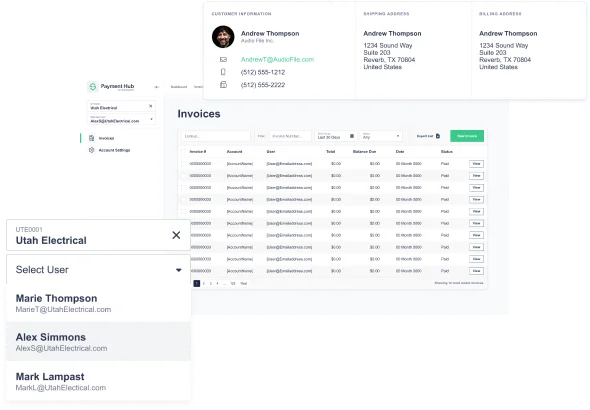
Customer payment portalA branded portal reading live A/R invoices and down payment invoices from Business One.
ACH paymentsACH and bank payments beside cards, posted as incoming payments the same way.
Lower card costs on commercial cards
Level 2 and Level 3 interchangeLine-item data from the B1 sales document goes with each eligible commercial card payment, on any of 19+ gateways.
Visa CEDPVisa's Commercial Enhanced Data Program grades that line data. From Visa's April 18, 2026 schedule, a payment with failed data is priced like one with none, and Visa doesn't publish the criteria, so the data comes from the B1 document lines themselves.
Card cost controls
- COMMERCIAL CARDLevel III from the sales document
- VISA CEDPLine-item data validated
- DEBIT CARDNever surcharged
Payment Hub vs SAP B1 payment options, honest side-by-side
SAP Business One does not ship with card processing. Partners fill the gap with add-ons that register inside the company database and connect to one processor. Payment Hub takes a different route, and the differences are practical rather than subtle.
| Capability | Typical SAP B1 add-on | Payment Hub on SAP B1 |
|---|---|---|
| Gateway / processor choice | ✗ Usually one processor per add-on, chosen by the add-on vendor | ✓ 19+ gateways on your merchant account: Worldpay, Adyen, Cybersource, Fortis, PayTrace, Stripe, Braintree, Authorize.Net and more |
| Customer self-service portal | ✗ Rarely included, or sold as a separate product | ✓ Branded portal reading live A/R invoices and down payment invoices from B1 |
| Click-to-pay links on invoices | ✗ Depends on the add-on | ✓ Payment link on the Crystal Reports or PLD invoice layout you already use |
| Down payment invoice handling | ✗ Often manual: pay, then create the incoming payment against the down payment invoice | ✓ Deposit posts as an incoming payment against the down payment invoice automatically |
| Multi-company | ✗ One add-on install and license per company database | ✓ One configuration mapping each company to its merchant account, bank and GL |
| Upgrade impact | ✗ Add-on must be re-registered and re-tested on each B1 patch level | ✓ Nothing installed in the company database, so B1 upgrades do not affect the integration |
| Level III line-item data | ✗ Uncommon | ✓ Line detail from the sales document attached to eligible commercial card transactions |
| ACH / eCheck | ✓ Some add-ons support it | ✓ ACH, eCheck and card on one portal, all posting as incoming payments |
An add-on is a reasonable choice for a single-company B1 customer with low card volume and a partner who already supports it. The case for Payment Hub gets stronger with each additional company database, with any real deposit or down payment workflow, and the moment a customer asks for a portal. Those are the three points where the add-on approach starts to cost more than it saves.
See it running against a test company in your own B1 environment
A 30-minute walkthrough: a deposit against a down payment invoice, real-time incoming payment posting and a portal reading live A/R invoices.
What changes when they do
The typical SAP B1 shop we meet has a good process on paper and a manual step in the middle. Invoices go out from B1 with the standard layout. Customers pay by check, by ACH they set up on their own, or by calling with a card number that someone types into a virtual terminal. The processor's report arrives and the bookkeeper creates incoming payments in B1 by hand, matching amounts to invoices. When a deposit is required, the down payment invoice and the payment get handled as two separate events that may or may not line up.
Payment Hub closes that gap. The customer pays from a link on the invoice or in a portal that reads open items from B1, and the result posts back through the Service Layer as an incoming payment applied to the invoice, or to the down payment invoice, in the right company database. The bookkeeper reviews instead of keys.
Without an add-on in your company database
SAP Business One runs companies of 10 to 500 people, usually with one or two people in finance. It doesn't ship with card processing, so partners fill the gap with add-ons that live in the company database and connect to one processor. Integrating Payment Hub with Business One adds payments through the Service Layer instead:
Questions
Does Clarity Payment Hub integrate with SAP Business One?
Yes. Payment Hub integrates with SAP Business One through the Service Layer, the REST and OData interface SAP ships with B1 for HANA and B1 for SQL. Invoice payments, deposits against down payment invoices, portal payments and refunds all post to B1 in real time as incoming payments.
Does SAP Business One have built-in credit card processing?
No. Business One does not ship with card processing. Partners cover the gap with add-ons tied to a single processor. Payment Hub provides processing, a customer portal, invoice links and Level III enrichment on 19+ gateways, without installing anything in the company database.
Which SAP B1 versions and platforms are supported?
Business One for SAP HANA and Business One for SQL from 9.3 onward, which is where the Service Layer is available on both platforms. Older SQL releases are assessed for a DI API path before quoting. On-premise, partner-hosted and SAP Business One Cloud deployments all work.
How does Payment Hub handle down payment invoices?
A deposit paid through Payment Hub posts as an incoming payment applied to the A/R down payment invoice. When the final A/R invoice is created with the down payment drawn, the customer sees the net balance on the invoice link and in the portal, and that payment applies to the final invoice. The two documents stay related the way SAP designed them to.
What is the implementation timeline for SAP Business One?
Forty-eight hours from Service Layer access is the standard go-live for the core integration: connection, company mapping, invoice link on your layout, testing in your B1 test company and cutover. Portal branding, gateway migration and recurring setup are added on top without delaying the core.
Related resources
Small-business payment automation on SAP Business One.
Live in 48 hours. Your B1 license, add-ons, layouts and customizations stay intact.
Book a Live Demo