


What Is the "Pay with Surcharge" Feature?
So what does "pay with surcharge" actually do? The Pay with Surcharge feature in Clarity Payment Hub integrates compliant credit card surcharges into your payment portal. When a customer selects a credit card as their payment method, the portal calculates a surcharge, a percentage you set within the card networks' caps, that covers the cost of credit card processing. The surcharge is displayed transparently before the customer authorizes the payment. Customers can see exactly what they will pay (original invoice + surcharge) or they can choose to avoid the surcharge by selecting an ACH bank transfer instead, which processes without an additional fee.
Unless an invoice is paid via paper check or direct ACH deposit, transaction charges end up the responsibility of the merchant. Credit card processing costs money. Traditionally, vendors have absorbed that cost themselves. But in a B2B context, there is no reason the vendor should bear this cost alone. It is the customer's choice to pay with a credit card instead of ACH or check, and that choice has a real cost. By offering surcharge options, you give customers the choice of how they want to pay while being transparent about the actual cost of their chosen payment method.
Why surcharge instead of a convenience fee? We offer both, but they follow different rules (see below). Clarity Payment Hub integrates surcharge functionality through 3rd-party surcharge providers that apply state-by-state rules and suppress the surcharge where a state bans it. Debit cards are never surcharged.
How Clarity Payment Hub Enables Compliant Surcharge Pass-Through
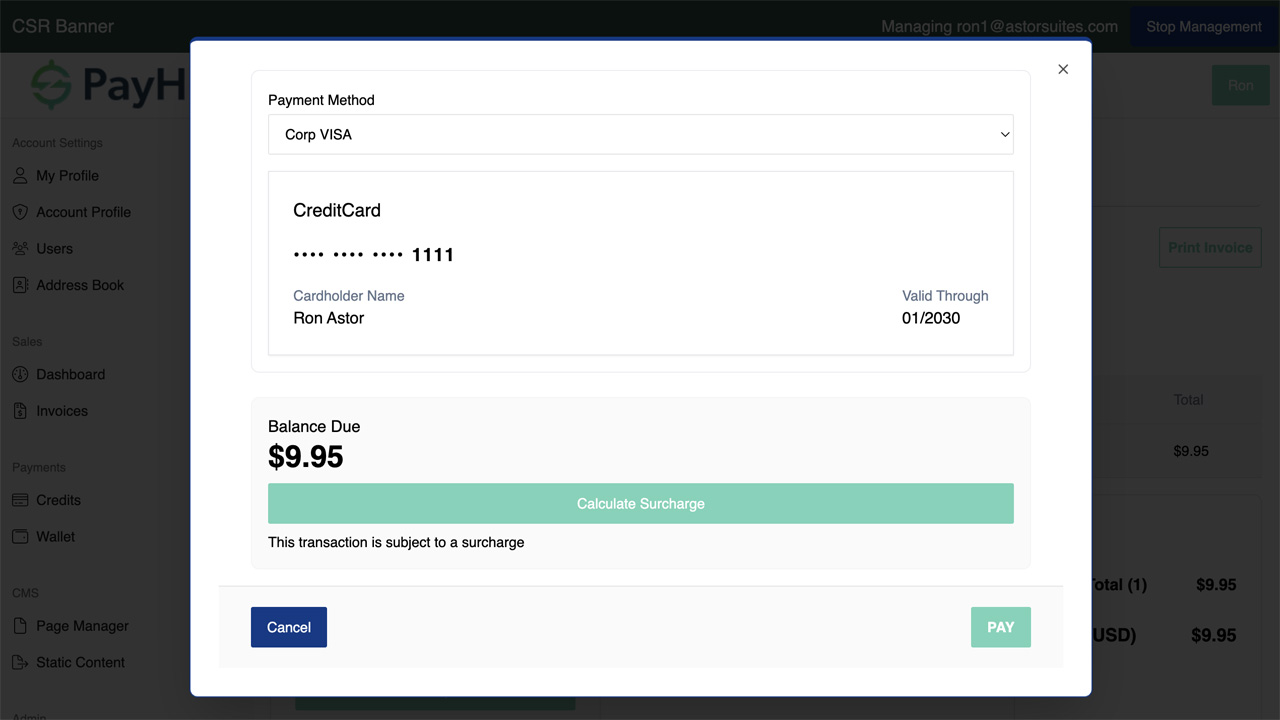
Clarity Payment Hub solves the surcharge problem by integrating compliant surcharge functionality directly into the payment portal. When a customer selects a credit card as their payment method, the portal calculates the surcharge at the rate you configure and displays it transparently before the customer authorizes the payment. The customer sees the original invoice amount, the calculated surcharge, and the total they will pay if they proceed. They then have the choice: pay with the surcharge, or select ACH (which has no surcharge) if they prefer to save the fee.
Behind the scenes, Clarity integrates with compliant 3rd-party surcharge providers that handle the regulatory complexity. The system automatically checks the customer's location and suppresses surcharges in states where they are restricted or prohibited. So a customer in Connecticut or Massachusetts, where surcharges are banned, never sees one. The rules still change often, so have your own counsel confirm your setup before you surcharge across several states.
When the payment is submitted, the surcharge amount is calculated and posted separately to your ERP. This separate posting allows you to track surcharge revenue distinctly from invoice payments, measure the revenue impact, and understand your true margin improvement from the feature.
- Transparent Surcharge Display Before AuthorizationCustomers see the surcharge amount calculated and displayed before they authorize. No surprises, no hidden fees. Complete transparency builds trust even when charging a fee.
- Automatic State-by-State RulesSurcharges are shown where allowed and suppressed where restricted, state by state, without manual work. Debit cards are never surcharged.
- Customer Choice: Surcharge or Surcharge-Free MethodsCustomers can pay with a surcharge via credit card, or avoid it by selecting ACH. This transparency and choice builds goodwill even though you are passing through costs.
- Separate Surcharge Line Items in ERPSurcharges post to your ERP as separate line items, not mixed in with the invoice payment. This allows clear accounting, margin tracking, and reporting on surcharge revenue impact.
- Configurable Surcharge PercentageYou set the surcharge percentage based on your actual processing costs. It can't exceed that cost or the card networks' caps: 3% on Visa and 4% on Mastercard. Different payment methods and card types can have different surcharge rates if desired.
Surcharge rules, and the fees that aren't surcharges
There are four ways to recover the cost of card acceptance, and the card networks set different rules for each (as of August 2026):
- Surcharge. A percentage or fixed amount on credit card payments only. Debit and prepaid cards are never surcharged, in any state. It's capped at 3% on Visa and 4% on Mastercard, and at your own cost of accepting the card, and it can apply to recurring payments.
- Convenience fee. A flat amount for paying through an alternative card-absent channel, such as an online portal, whatever the payment size. It isn't available if you only take card-absent payments, and it can't be charged on recurring or installment payments.
- Service fee. Only for government, utility and education merchants in the nine categories Visa permits. It can apply to credit, debit and prepaid cards, can't be combined with a surcharge or convenience fee, and since October 2025 no longer needs Visa registration or a separate transaction.
- Cash or ACH discount. A lower price for paying by ACH or check, shown as a discount off the card price. It's the usual route in states that ban surcharges.
State law adds to the network rules. Connecticut, Massachusetts, Maine and Puerto Rico ban surcharges, though Connecticut and Maine let government entities add fees. Colorado and Oklahoma cap them at 2% or your actual cost, whichever is lower; New Jersey caps them at your cost and Minnesota at 5%; New York requires the total price including the surcharge to be shown. Louisiana bans debit surcharges from August 1, 2026, with a private right of action. Courts have limited the statutes in California, Florida, Texas and Kansas, so those need care rather than a blanket answer.
Payment Hub's surcharge providers apply the state rules, but the law changes often. Have your own counsel confirm the setup before you surcharge in several states.
Learn What Clarity Can Do for You
We're happy to talk with you and answer any questions. Click the button below and fill out our short form or use our live chat feature (button on the bottom right corner) to talk to an expert right away!
Surcharging in your ERP
The surcharge posts as its own line, apart from the invoice, so it lands a little differently in each ERP:
- Epicor Eclipse payment processing: surcharges on contractor account payments post as their own line, apart from the invoice.
- Epicor Prophet 21 payment processing: adds the surcharging most P21 setups lack, as a line separate from the invoice amount.
- Epicor Eagle payment processing: a disclosed surcharge on store charge-account payments, never on a debit card.
- Epicor Kinetic payment processing: surcharge settings per company, with the fee kept apart from the AR invoice balance.
- Epicor E10 payment processing: surcharge lines kept apart from ARInvoice balances, company by company.
- Infor SyteLine payment processing: per-state and per-card-brand rules, with the fee recorded apart from the invoice.
- SYSPRO payment processing: per-country rules for SYSPRO Companies in more than one country, never applied to debit.
- Sage 100 payment processing: the surcharging Sage 100's native module doesn't include, posted on its own line.
- NetSuite payment processing: a surcharge shown before payment on NetSuite invoices, recorded apart from the invoice amount.
- Sage Intacct payment processing: set per entity, so a U.S. entity can surcharge while the others don't.
- Acumatica payment processing: a surcharge on Acumatica invoice payments, kept apart from the document balance.
- Business Central payment processing: the fee shown before the customer pays, recorded apart from the sales invoice.
- Dynamics GP payment processing: recorded in GP on its own line, and the same rules carry over to your next ERP.
- Dynamics 365 Finance payment processing: surcharge rules per legal entity, for U.S. entities where it's allowed.
- Odoo payment processing: a disclosed fee where allowed, posted apart from the invoice's journal items.
- Sage 300 payment processing: disclosures in the customer's language, with the fee posted apart from the invoice.
- Sage X3 payment processing: surcharge rules for each legislation, only where a surcharge is allowed at all.
- SAP Business One payment processing: a disclosed surcharge on card payments, posted apart from the A/R invoice.
- SAP S/4HANA payment processing: U.S. and Canadian Company Codes only, where card-network and local rules allow it.
- Dynamics NAV payment processing: U.S. customers only; EU rules don't allow surcharges on consumer cards.
All 25 ERP integrations are on the Payment Hub integrations page.
See It in Action: Surcharge Payment Demo
Watch the Demo
Portal Screenshot
Step-by-Step Walkthrough
- Log In and Select InvoiceNavigate to your Clarity Payment Portal and select the invoice you want to pay. View the invoice details including amount, due date, and payment history.
- Choose Payment MethodSelect a payment method. If you choose Credit Card, the portal calculates the surcharge (if applicable in your state). If you choose ACH, there is no surcharge.
- Review Surcharge DisplayThe portal shows a clear payment summary: original invoice amount, calculated surcharge, and total amount you will pay. This is displayed before you authorize, giving you full transparency.
- Make Your ChoiceYou can proceed with the credit card payment including the surcharge, or you can go back and select ACH to avoid the surcharge. The choice is entirely yours.
- Enter Payment DetailsEnter or select your credit card or ACH account. Your payment information is stored securely in a PCI DSS-compliant vault.
- Submit PaymentClick Pay to submit your payment. The transaction processes, and the surcharge (if included) is posted separately to your vendor's ERP as a distinct line item. You receive confirmation of the total paid, including any surcharge.
Frequently Asked Questions
What is a surcharge and why am I seeing one?
A surcharge is a fee that covers credit card processing costs. Instead of the vendor absorbing this cost, they pass it through to customers who choose to pay by credit card. It applies to credit cards only, never debit. You can avoid the surcharge by paying with ACH bank transfer instead.
Is paying a surcharge mandatory?
No. The surcharge is optional and transparent. You see the surcharge amount before authorizing, and you have the choice to proceed with it or select a different payment method (like ACH) that does not include a surcharge.
Are surcharges legal?
In most U.S. states, yes, within the card networks' rules: credit cards only, never debit; no more than 3% on Visa, 4% on Mastercard or your cost to accept the card; and disclosure before payment. Connecticut, Massachusetts, Maine and Puerto Rico ban surcharges, and Colorado and Oklahoma cap them at 2% (as of August 2026). Clarity Payment Hub integrates 3rd-party surcharge services that apply state rules, but check with your own counsel before surcharging across several states.
How is the surcharge calculated?
The surcharge is calculated as a percentage of the invoice amount (set by your vendor, within the card networks' caps). The exact percentage is determined by your vendor's surcharge service provider and is displayed transparently before you authorize payment.
Where does the surcharge go?
The surcharge is posted separately to your vendor's ERP as a distinct line item. This keeps accounting clean and allows your vendor to track surcharge revenue separately from invoice payments. The surcharge offsets the vendor's credit card processing costs.
Can I pay with ACH to avoid the surcharge?
Yes. ACH bank transfers do not include a surcharge. If you want to avoid the surcharge, select ACH as your payment method instead of a credit card.
Is this the same as dual pricing or convenience fees?
No. Dual pricing lets vendors charge different prices depending on payment method. A convenience fee is a flat amount for paying through a channel such as an online portal, whatever the payment size, and it can't be charged on recurring payments. A surcharge is a percentage on credit card payments only, capped by the card networks and adjusted for state rules.
Faster AR. Fewer headaches.
See Clarity Payment Hub running inside your ERP, or spin up a free trial environment and click around on your own. Either way, you’ll see exactly how it handles your invoice mix, your gateway, and your Level II/III data, before you commit to anything.
Live Demos