


Payment infrastructure for Navision's final chapter
Use Clarity Payment Hub for Dynamics NAV payment processing and add a customer portal and real-time payment posting through NAV's SOAP and OData web services.
When you move to Business Central, the portal and saved payment methods come with you.
So, what's the problem? Well, NAV customers are now in their final extended-support window. NAV 2015's security updates ended January 2025. NAV 2016 ended April 2026, and NAV 2017 ends January 11, 2027. NAV 2018, the last version Microsoft released, ends January 11, 2028. After those dates, NAV receives no Microsoft support of any kind: no security patches, no tax updates, no technical support. The migration clock is running.
Cash receipts posted to NAV, not keyed
AR automationReminders and dunning on open customer ledger entries, alongside NAV's own reminder terms.
Cash application and payment reconciliationPayments post to NAV as customer payments applied to the sales invoices they settle.
One payment, posted to NAV
- CUSTOMER PORTALPaid across open ledger entries
- CASH RECEIPTPosted through web services
- APPLYApplied to the sales invoices it settles
- REMINDERSAlongside NAV's reminder terms
Card, ACH and SEPA on NAV, and after it
B2B payments on NAV and after itCard, ACH and SEPA payments against NAV sales invoices, kept exactly as they are when Business Central takes NAV's place.
Credit card processing fees and surchargingFor U.S. customers, a disclosed card surcharge where state and network rules permit; in the EU, surcharges on consumer cards aren't allowed, and a debit card is never surcharged anywhere.
Today, and after the move
- SALES INVOICEPaid by card, ACH or SEPA
- SAVED METHODSKept in Payment Hub
- BUSINESS CENTRALConnector swap
- PORTALSame login, same stored methods
One portal for NAV today and Business Central later
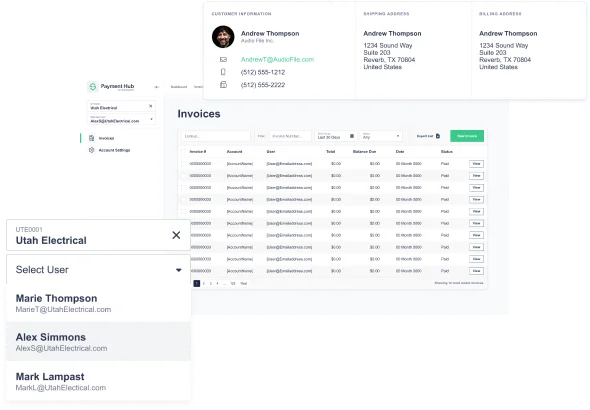
Customer payment portalCustomers log in to one portal that reads NAV today and Business Central later, with the same login and stored methods.
ACH paymentsBank payments in whatever form the customer's country uses: ACH in the U.S., SEPA Direct Debit across the euro area.
Lower card costs on commercial cards
Level 2 and Level 3 interchangeEach eligible commercial card payment carries the line detail of the NAV sales invoice it pays.
Visa CEDPThose U.S. commercial card payments are graded under Visa's Commercial Enhanced Data Program, whose April 18, 2026 schedule charges failed data the same as missing data, against criteria Visa keeps private. NAV's own invoice lines supply the data, and Business Central's will after the move.
Card cost controls
- COMMERCIAL CARDLevel III from sales invoice lines
- VISA CEDPLine-item data validated
- DEBIT CARDNever surcharged
See it running against your own NAV environment
A 30-minute walkthrough: standard web services integration, real-time cash receipt posting, and a branded portal reading live NAV data.
Where Payment Hub fits
Is there any good news? Yes. While that timeline puts NAV customers in a similar position to GP customers, but with one important difference: the migration destination is cleaner. Dynamics 365 Business Central isn't a completely different ERP the way BC-vs-GP is, BC is literally the cloud continuation of NAV, inheriting NAV's data model, page structure, and business logic. Microsoft provides a specific Cloud Migration Tool for NAV→BC. Customizations convert from NAV's C/AL language to BC's AL language through documented tooling. A NAV-to-Business Central migration is a project in its own right, usually measured in months.
Payment Hub fits this context: integrate with NAV today through SOAP and OData web services (the NAV-era standard), benefit from customer portal, real-time cash application, 19+ gateway choices, and Level III interchange optimization during the remaining NAV runtime. When you migrate to BC, the Payment Hub layer (includes the customers, accounts, invoices, card tokens, etc.) follows forward. Clarity Connect swaps its NAV connector for BC's REST API v2.0 connector, and the customer-facing portal, saved tokenized methods, and subscription enrollments all stay in place.
NAV version support dates, where your version stands
Microsoft ended mainstream support for NAV 2018 (the last version released) in January 2023. Extended support, security updates only, is ending on a per-version schedule. Here's what's still supported and for how long.
- NAV 2015Ended Jan 2025January 2025No security updates since. Migrate urgently or accept the support gap.
- NAV 2016Ends now · Apr 2026April 2026Ending this month. NAV 2016 customers are officially out of Microsoft support after this date.
- NAV 2017~9 monthsJanuary 11, 2027Roughly 9 months of security updates remaining. Migration planning window is narrow.
- NAV 2018~21 monthsJanuary 11, 2028Last NAV version Microsoft released. Final date on the NAV lifecycle calendar.
The practical implication: if you're running NAV 2015 or 2016, you're either out of support or about to be, and Microsoft's recommended path is Business Central (the direct successor). NAV 2017 customers have until January 2027, about 9 months as of this writing. NAV 2018 customers have until January 2028, about 21 months. After those dates, NAV receives no support of any kind. Migration planning that previously seemed "eventually" is now genuinely time-bound.
For customers running older NAV versions (NAV 2013 or 2013 R2), Microsoft's migration tool requires an upgrade to NAV 2018 first before migrating to Business Central. That adds an intermediate step but doesn't prevent the eventual migration, it just means more runway required. Payment Hub works across all these versions and through the migration path.
The NAV → Business Central bridge, Payment Hub on both sides
Unlike GP→BC (where the data model changes substantially), NAV→BC is a more natural upgrade. BC inherits NAV's core entities, Customer, Sales Invoice, Payment Journal, General Ledger, which means Payment Hub's hand-off is the cleanest migration scenario we support.
Payment Hub running on Dynamics NAV
NAV 2015 / 2016 / 2017 / 2018 through extended-support dates
- Integrates via SOAP + OData web services
- Reads Customer, Sales Invoice, Sales Line entities
- Posts Cash Receipt Journal via codeunit web service
- Customer portal reads live NAV data
- L3 enrichment from Sales Invoice Line details
- 19+ gateways, ACH, wallets, all available
- Subscription billing runs against NAV customers
- Multi-company NAV databases supported
Payment Hub running on Business Central
NAV's direct successor, Microsoft's recommended path
- Clarity Connect swaps NAV web services → BC REST API v2.0
- Customer portal URL unchanged · users unchanged
- Saved tokenized payment methods carry forward
- Subscription enrollments continue uninterrupted
- Same gateway relationships & merchant accounts
- L3 logic applies to BC's Sales Invoice Line data
- Same team-facing views & audit trail
- Migration focuses on ERP, payment layer just works
Because NAV and BC share the same underlying entity model (Customer, Sales Invoice, Payment Journal all exist in both systems with compatible structures), Payment Hub's connector swap is nearly transparent. The portal URL, customer accounts, saved methods, subscription enrollments, and transaction history all carry forward. Your customer's AP team logs in the week before migration and the week after migration and sees the same portal with the same data, the only difference is that the back-end is now writing to BC instead of NAV.
This matters strategically because it removes one of the common migration risks: the "will our customers still be able to pay us during cutover?" question. For NAV→BC migrations running Payment Hub, the answer is yes, the payment layer is stable throughout because it's not actually being migrated. Only the ERP beneath it is changing.
For the years before Business Central
Dynamics NAV, still called Navision by many long-time users, is in its last extended-support years: NAV 2017 runs to January 2027 and NAV 2018 to January 2028. Its natural next step is Business Central. Integrating Payment Hub with NAV adds the receivables side now, through NAV's SOAP and OData web services, and keeps it when you move:
Questions
Does Clarity Payment Hub integrate with Dynamics NAV (Navision)?
Yes. Clarity Payment Hub integrates with Microsoft Dynamics NAV through NAV's documented web services stack, SOAP web services (available since NAV 2009) for real-time transactional integration, and OData web services for faster query-style data access. Authentication uses NAV's standard Windows integrated auth or Basic auth over HTTPS.
What's the NAV end-of-life timeline?
NAV 2018 was the last version Microsoft released. Mainstream support for NAV 2018 ended January 2023. Extended support (security updates only) ends on a per-version basis: NAV 2015 ended January 2025, NAV 2016 ends April 2026, NAV 2017 ends January 11, 2027, and NAV 2018 ends January 11, 2028.
Will Payment Hub continue to support us once we migrate to Business Central?
Yes. Payment Hub is ERP-agnostic, it runs against 25+ ERPs including Dynamics 365 Business Central (NAV's direct successor), Dynamics 365 Finance & Operations, NetSuite, Acumatica, Sage, SAP, and more. When you migrate from NAV to BC, the Payment Hub side changes minimally: Clarity Connect swaps its NAV web-services connector for BC's REST API v2.0 connector with OAuth 2.0 authentication through Microsoft Entra ID.
How does Payment Hub integrate with NAV technically?
Through NAV's documented web services, both SOAP (for codeunits and pages, available since NAV 2009) and OData (for tabular data and queries, faster for high-volume reads). Payment Hub publishes and consumes the standard NAV web services exposed through the Web Services page.
What's the implementation timeline for NAV?
A typical Payment Hub + NAV integration goes live in 48 hours once Clarity receives NAV test-company credentials (web services URL + appropriate NAV user permissions), gateway credentials, and your baseline routing configuration (which NAV company databases map to which merchant accounts and cash GL accounts).
Related resources
Payment infrastructure that outlives NAV's sunset.
Live in 48 hours, with your NAV license, customizations, and ISV products intact. When you migrate, the Payment Hub layer follows to Business Central with a connector swap.
Book a Live Demo