


Ending the CSV era of cash application
The biggest complaint of our clients is the monthly reconciliation. For a decade, the standard AR reconciliation workflow has looked the same: download yesterday's settlement report from the gateway, open it in a spreadsheet, match each transaction to an invoice in the ERP, key the cash receipt into the AR module, pray the totals agree with the bank deposit when it lands, and repeat. It's a monthly tax of several days on the AR team and the controller. It doesn't scale with invoice volume. And it produces a predictable crop of reconciliation mysteries at month-end when one transaction got double-entered, one was missed, or a chargeback landed and nobody caught it.
Before Payment Hub
CSV-based cash application
- Download gateway settlement reports (CSV, SFTP, or email)
- Open in Excel, cross-reference against invoice list
- Manually key cash receipts into the ERP
- Reconcile batch totals against the ERP GL cash
- Match batch against bank deposit when it lands (1–3 days later)
- Chase NSF returns and chargebacks via gateway portal, email
- Month-end: days catching up missed entries and mismatches
- Audit trail lives in spreadsheets and gateway-download folders
With Payment Hub
Real-time automated reconciliation
- Per-transaction cash receipts post to ERP at gateway authorization
- Settlement-batch ID travels with each transaction
- Bank-deposit reconciliation matches against already-applied receipts
- NSF and chargeback return codes auto-reverse in ERP with reason codes
- Credit-memo applications and refunds post as separate audit-traceable records
- Surcharges and processing fees separated cleanly in GL
- Month-end: review exceptions on the morning of close
- Audit trail: every transaction tied to gateway, bank, and ERP records
Automated reconciliation isn't only faster. The change isn't just speed — it's correctness. Because every transaction posts in real time with the gateway's settlement ID, chargeback reference, and return-code information already attached, the ERP record for each payment is complete from the moment it's written. There's no "reconcile this later" queue, because there's nothing sitting unposted waiting for reconciliation.
How Payment Hub reconciles every transaction
Eight mechanics run the reconciliation layer. Each one replaces a step the AR team is doing manually today — or worse, a step that's skipped and surfaces as a reconciliation mystery at month-end.
Portal Screenshot
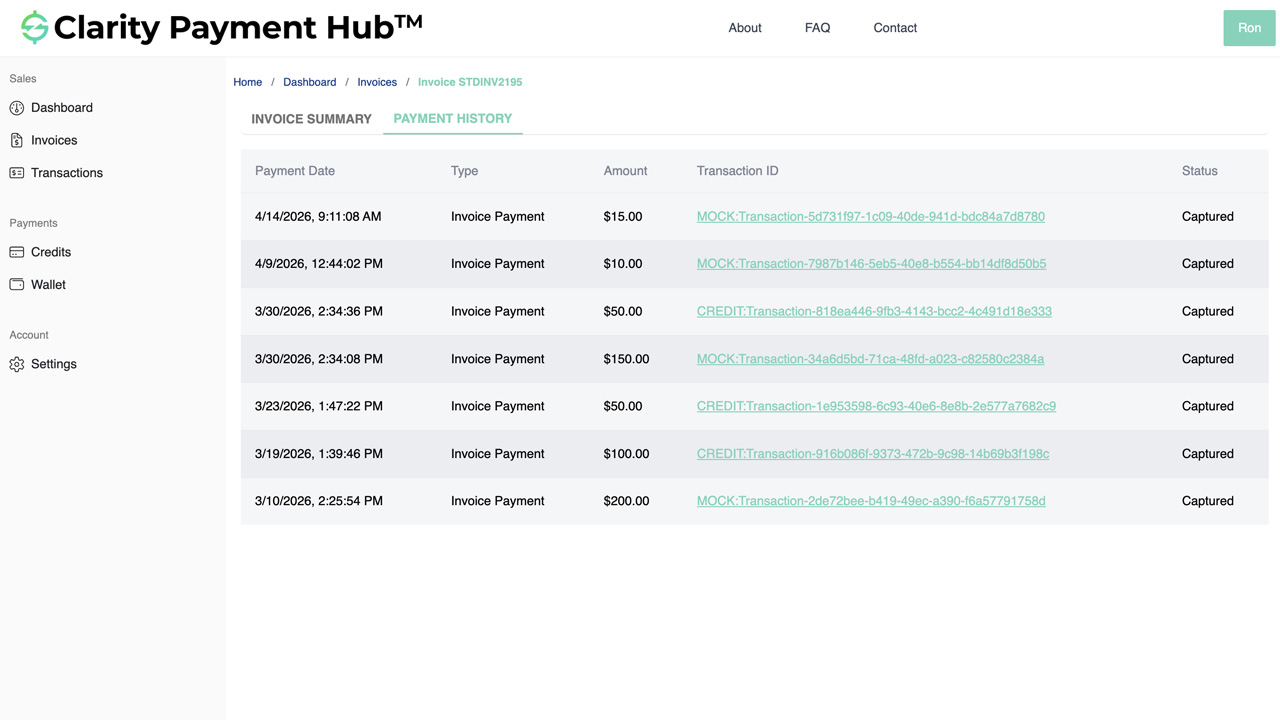
- Per-transaction real-time ERP postingEvery customer payment — portal, MOTO, POS, ecommerce, ACH auto-debit — writes a cash-receipt record to your ERP through Clarity Connect the instant the gateway authorizes. Correct invoice, correct customer, correct GL account.
- Settlement-batch trackingEvery transaction carries the gateway's settlement batch ID into the ERP. When the batch settles and funds into your bank, Payment Hub matches the deposit to the already-posted receipts — no spreadsheet cross-referencing.
- NSF and chargeback auto-reversalACH returns (NSF R01, account closed R02, authorization revoked R07, and others) and card chargebacks ingest from the gateway in real time. Payment Hub writes a reversal to the ERP, re-opens the original invoice with the reason code, and routes the exception to AR.
- Surcharge and fee separationSurcharges (customer pass-through) post as separate ERP lines from the invoice amount. Processing fees (merchant cost) deduct from deposits and post to a fee-expense GL account. Your revenue, surcharge income, and processing-cost lines stay distinct.
- Multi-gateway, one reconciliationIf you run multiple gateways (Worldpay for card, Adyen for international, USAePay for branch, bank ACH), every transaction from every gateway flows through the same ERP posting path — one cash-GL view, one exception queue, one audit trail.
- Credit memos and refunds as discrete entriesCredit memo applications close against specific invoices; refunds reference the original payment token and cash receipt; short-pays leave unpaid balances open with reason codes. Every adjustment is a separate, audit-traceable record — not a blended line.
- Exception-only AR worklistThe transactions that need judgment — disputes, mismatched deposits, high-exposure returns, out-of-policy short-pays — surface in an AR worklist with full context (customer, invoice, gateway reference, bank deposit, history). Everything else reconciles itself.
- Full audit trail & exportable reportsEvery transaction links gateway reference ID, settlement batch ID, bank deposit reference, ERP cash-receipt ID, invoice ID, customer, authorizing contact, method, and timestamp. Exportable reports for controllers, auditors, and month-end review.
Watch the Demo
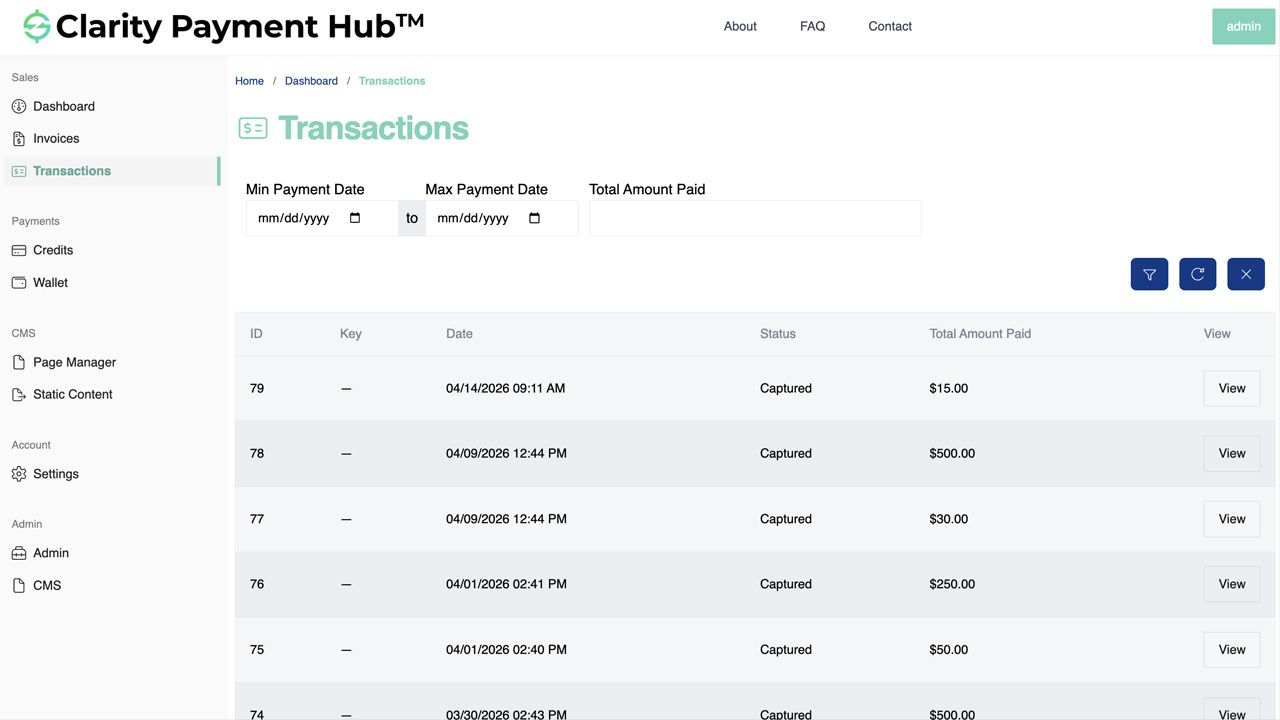
How transactions map to ERP postings
Every transaction type writes a specific set of records to your ERP. Here's the mapping Payment Hub runs automatically — no manual GL-code lookup, no miskeyed entries, no "where should this go" support tickets.
| Transaction type | ERP records written | GL accounts affected |
|---|---|---|
| Customer invoice payment WEB / TEL / CCD / card | Cash receipt applied to invoice · Invoice closed (or partial balance) | Debit Cash / GL Clearing · Credit AR |
| New ecommerce sales order cart-based checkout | Sales order · Cash receipt (pay-now) OR open invoice (charge-to-account) | Debit Cash / AR · Credit Revenue · (Tax, Shipping, etc.) |
| Credit memo application | Credit-memo closure · Invoice balance reduction | Debit Credit Memo Liability · Credit AR |
| Refund to original method | Refund transaction · Original-cash-receipt reversal | Debit Revenue (reversal) / AR · Credit Cash |
| Compliant surcharge (enabled by state / network) | Surcharge line separated from invoice amount | Credit Surcharge Income (separate from revenue) |
| Processing fees (merchant cost on settlement) | Fee deduction from deposit, expense entry | Debit Processing-Fee Expense · Credit Cash (net deposit) |
| ACH return (NSF R01, R02, R07, etc.) | Cash-receipt reversal · Invoice re-opens with reason code | Debit AR · Credit Cash (reversing the original posting) |
| Card chargeback | Chargeback-reserve entry · Invoice re-opens with dispute flag | Debit Chargeback Reserve / AR · Credit Cash |
| Pay-on-account deposit | Unapplied-cash entry · Auto-apply to open invoices per rules | Debit Cash · Credit Customer-Credit Liability (initial) / AR (applied) |
| Gift card / store credit | Liability decrement · Invoice settled | Debit Gift-Card Liability · Credit AR |
Learn What Clarity Can Do for You
We're happy to talk with you and answer any questions. Click the button below and fill out our short form or use our live chat feature (button on the bottom right corner) to talk to an expert right away!
ERP integration — where the reconciliation actually happens
Payment Hub's reconciliation isn't a separate reconciliation system — it's per-transaction writes to your existing ERP through Clarity Connect. Your ERP stays the book of record; Payment Hub makes sure the records are correct from the moment they're written.
- Inbound from ERPCustomers, invoices, GL chart of accounts, payment terms, credit memos, chargeback reserves, bank-account references — all available for transaction routing and reconciliation logic in real time.
- Outbound to ERPPer-transaction cash receipts, credit-memo applications, short-pay records with reason codes, refund transactions, chargeback reserves, surcharge lines, processing-fee expense entries, NSF reversals — each as a discrete correct record.
- 25+ ERP connectorsNetSuite, Acumatica, Dynamics 365 BC / F&O, Dynamics GP / NAV, SAP S/4HANA Cloud and ECC, Sage 100 / 300 / Intacct, Oracle EBS, Epicor P21 / Kinetic / Eclipse / Eagle, Infor SX.e / CloudSuite, SYSPRO, Workday, Tyler, and more.
- No ERP modificationsClarity Connect uses only documented, supported integration points. No schema changes, no ERP-side custom code, no plugins to maintain. Your GL structure, customer records, and bank-reconciliation module stay the way your controller set them up.
For cloud ERPs (NetSuite, Acumatica, Dynamics 365 BC, SAP S/4HANA Cloud), Clarity Connect talks directly to the ERP's cloud APIs. For on-premise ERPs, a lightweight outbound-only secure agent calls from inside your network — no inbound firewall ports, no VPN tunnel, no public ERP exposure.
Automated cash application in your ERP
Cash application means writing each payment to the right record in your ERP. That record differs by ERP:
- Epicor Eclipse payment processing: one cash receipt per generation invoice, at the branch that owns it.
- Epicor Prophet 21 payment processing: cash receipts applied to the P21 invoices they settle, by branch GL cash account.
- Epicor Eagle payment processing: Received On Account postings by customer and by store.
- Epicor Kinetic payment processing: captures applied to AR invoices through standard Kinetic posting.
- Epicor E10 payment processing: CashHead receipts against the ARInvoice each payment settles.
- Infor SyteLine payment processing: line-level application through SyteLine's IDO web services.
- SYSPRO payment processing: AR Receipts through e.net Business Objects, per Company and currency.
- Sage 100 payment processing: AR Receipts with line-level distribution in real time.
- NetSuite payment processing: payment on account applied oldest-first, with journal entries for authorization and settlement.
- Sage Intacct payment processing: AR Payments carrying all eight dimensions of the invoice they settle.
- Acumatica payment processing: payments, deposits, captures and credit applications posted to Acumatica in real time.
- Business Central payment processing: payments against posted sales invoices, with journal entries for authorization and settlement.
- Dynamics GP payment processing: RM cash receipts through eConnect, applied to the SOP invoices they settle.
- Dynamics 365 Finance payment processing: customer payment journals settled against the invoice or prepayment they pay.
- Odoo payment processing: line-level application through account.move and account.payment.
- Sage 300 payment processing: AR receipts per Company, with cross-currency captures revalued in the GL.
- Sage X3 payment processing: one capture posted to every parallel ledger with its analytical dimensions.
- SAP Business One payment processing: incoming payments applied to A/R and down payment invoices through the Service Layer.
- SAP S/4HANA payment processing: Incoming Payments posted to the Universal Journal in each Company Code.
- Dynamics NAV payment processing: customer payments applied to the NAV sales invoices they settle.
All 25 ERP integrations are on the Payment Hub integrations page.
ERP Payment Reconciliation FAQ
The questions controllers, AR leads, and IT teams ask before rolling out Payment Hub's reconciliation layer.
What does Payment Hub replace in our current reconciliation workflow?
It replaces the CSV-based cash-application workflow most AR teams run today: download a settlement report from the gateway or bank, match each line to an invoice in the ERP, key the cash receipt into the ERP, then reconcile the deposit total at month-end against bank statements and gateway funding.
Does it actually reconcile against our bank deposits?
Yes. Payment Hub tracks each transaction from customer-payment through gateway-settlement through bank-deposit, with the settlement batch ID on both sides so the gateway's funded batches match the bank's ACH / card deposits automatically.
How does it handle NSF returns, chargebacks, and reversals?
When a transaction returns — ACH NSF (R01), account closed (R02), authorization revoked (R07), or a card chargeback — Payment Hub ingests the return code from the gateway in real time, writes a reversing entry to the ERP that re-opens the original invoice with the return reason attached, and routes the exception to your AR worklist.
What happens with surcharges, processing fees, and gateway costs?
Payment Hub separates cash receipts from surcharges and processing fees in the ERP posting — so your GL sees the true revenue (invoice amount), the surcharge income (pass-through, if enabled), and the processing-fee expense (merchant cost) as three distinct lines.
Does it handle credit memos, refunds, and adjustments?
Yes. Credit memo applications, refund transactions (to the original payment method), and short-pay adjustments all post as separate records in the ERP — not blended into cash receipts.
Related resources
Want month-end cash application already done?
Book a 30-minute walkthrough and see the reconciliation layer run against a sandbox of your own ERP — per-transaction posting, deposit matching, NSF and chargeback handling, surcharge and fee separation. Live in 48 hours; your gateway stays; your controller stops spending days on what should be a morning.
Book a Live Demo