


Why Eclipse distributors add Payment Hub
Use Clarity Payment Hub for Epicor Eclipse payment processing and post job-account invoices, counter will-calls and portal payments to Eclipse as cash receipts against the right generation, at the right branch, on the gateway you choose.
Eclipse is exceptionally good at the electrical and plumbing distribution problem: branch inventory, job accounts, order generations, will-call and delivered lines on the same ticket. Payment acceptance was bolted on later, and it shows at the counter and in the AR office.
Cash receipts by generation and by branch
AR automationStatement autopay, installment arrangements on past-due job accounts and reminder emails run on a schedule for each branch, with dunning when an attempt fails. Every run posts to Eclipse as an ordinary cash receipt, so the credit department sees it where it already works.
Cash application and payment reconciliationA payment applies to the generation invoice it settles, at the branch that owns it, so one contractor order that invoiced four times reconciles as four receipts. Unapplied and on-account payments post with the customer and branch already set, and the processor deposit ties to each branch's cash GL account.
One order, four generations
- S1042377 · GEN 1Paid at the counter
- GEN 2Paid in the portal
- GEN 3Statement autopay
- GEN 4Waiting to invoice
Payments shaped like contractor buying
B2B payments shaped like contractor buyingA deposit on special-order gear, card-present payment for the generation picked up at will-call, then one portal payment across the generations delivered to the job site. Each lands against its own invoice.
Credit card processing fees and surchargingWhere state law and card-network rules allow it, Payment Hub applies a disclosed surcharge to credit card payments on account and posts it to Eclipse as its own line. Debit cards are never surcharged, in any state.
A contractor order, end to end
- SPECIAL ORDERDeposit taken
- WILL-CALLCard-present at the counter
- DELIVEREDOne portal payment across generations
- SURCHARGEDisclosed where rules allow
A portal for contractors with jobs at several branches
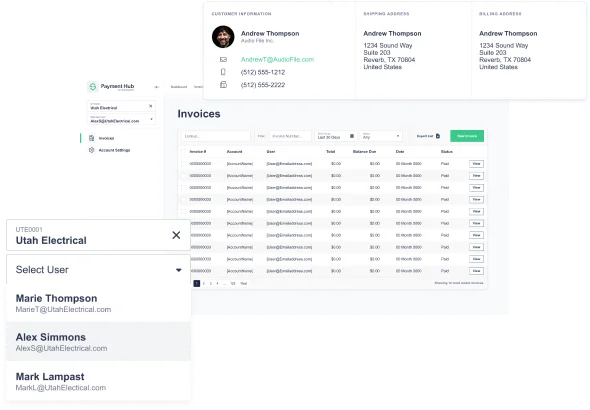
Customer payment portalContractors with jobs at several branches see every open invoice, by job and by branch, in one login, read live from Eclipse. Their AP team pays by card or bank account without calling the credit department.
ACH paymentsACH and eCheck sit on the same invoice links, statements and autopay as cards, which suits waterworks and utility distributors billing large project invoices. Each settles to Eclipse as a cash receipt like any other payment.
Lower card costs on commercial cards
Level 2 and Level 3 interchangeContractors pay electrical and plumbing distributors on purchasing and commercial cards. Payment Hub attaches the Eclipse order lines (product, quantity, unit price, tax and ship-to) to each eligible payment, instead of a one-line invoice summary.
Visa CEDPVisa now grades commercial card payments on that line-item data, and under its schedule effective April 18, 2026, a payment whose data fails validation is priced the same as one that sent none. Visa doesn't publish its exact criteria, which is why the detail comes from the real Eclipse order lines rather than a typed summary.
Card cost controls
- COMMERCIAL CARDLevel III from Eclipse order lines
- VISA CEDPLine-item data validated
- DEBIT CARDNever surcharged
Payment Hub vs Epicor Payment Exchange on Eclipse, honest side-by-side
Epicor Payment Exchange integrates with Eclipse at the counter and on orders, and for card-present sales it does the job. Payment Hub is about everything after the counter: invoices, statements, portals and the cash application behind them. Many distributors run both.
| Capability | Epicor Payment Exchange on Eclipse | Payment Hub on Eclipse |
|---|---|---|
| Gateway / processor choice | ✗ Epicor is the processor | ✓ 19+ gateways on your merchant account: Worldpay, Adyen, Cybersource, Fortis, PayTrace, Stripe, Braintree, Authorize.Net and more |
| Counter card present | ✓ Strong: integrated at the counter with receipt | ✓ Supported, and most distributors keep EPX at the counter and use Payment Hub for AR |
| Customer self-service portal | ✗ Not included | ✓ Branded portal showing open invoices by job and branch, read live from Eclipse |
| Click-to-pay links on invoices | ✗ Not included | ✓ Payment link on every Eclipse invoice form, tokenized, with the cash receipt applied on payment |
| Per-generation cash application | ✗ Manual in cash receipts | ✓ Each payment applies to the generation invoice it settles automatically |
| Statement autopay and ACH | ✗ Card-focused, no autopay | ✓ Statement autopay, installments, ACH and eCheck on one portal, all posting as cash receipts |
| Level III line-item data | ✗ Not sent | ✓ Order line detail attached to eligible commercial card transactions |
| Multi-branch routing | ✓ Per-branch processing | ✓ One configuration mapping each branch to merchant account, bank and GL |
The fair summary is that EPX is a counter solution and Payment Hub is an AR solution. A distributor with two branches and a small job-account book can live on EPX alone. Distributors add Payment Hub when cash application across generations eats the credit department's month, when contractors ask to pay online, or when someone finally looks at what Level III would save on the contractor card mix.
See it running in your own Eclipse test environment
A 30-minute walkthrough: a deposit on a special-order line, a counter payment tied to a will-call generation, and cash receipts posting per generation and per branch.
What changes when they do
The Eclipse distributors we work with tend to run the same way. Contractors buy on job accounts and pay by statement, which means checks, a lot of them, matched by hand. Counter sales on a card go through an EPX terminal that knows the order but not much else. Anyone who wants to pay online calls the branch or emails a card number to the credit department. The AR team spends the first week of every month applying cash and the rest of it chasing the balance.
Payment Hub connects those pieces. A contractor pays a job invoice from a link, or logs into a portal that shows every open invoice across the branches they buy from, or pays at the counter on a terminal tied to the generation being picked up. Each payment posts to Eclipse as a cash receipt applied to the right generation invoice, at the right branch, on the right GL account. The credit department reviews instead of keys.
Built for electrical, plumbing and HVAC distribution
Electrical, plumbing, HVAC and PVF distributors on Eclipse sell to contractors on job accounts, from several branches, on orders that ship in generations. Integrating Payment Hub with Epicor Eclipse keeps everything Eclipse and Epicor Payment Exchange already do at the counter, and adds the receivables side of that business:
Questions
Does Clarity Payment Hub integrate with Epicor Eclipse?
Yes. Payment Hub integrates with Epicor Eclipse through Eclipse's API and web services layer. Invoice payments, deposits, counter payments, portal payments and refunds all post to Eclipse in real time as cash receipts applied to the generation invoice they settle, at the branch that owns it.
We use Epicor Payment Exchange at the counter. Do we have to replace it?
No. Most Eclipse distributors keep EPX at the counter and add Payment Hub for AR: the portal, invoice links, statement autopay and ACH. The two coexist. If you want one processor everywhere later, Payment Hub can drive counter terminals too.
How does Payment Hub handle order generations?
Each generation invoices on its own in Eclipse, and Payment Hub applies each payment to the specific generation invoice it settles. A contractor who pays two open generations in the portal produces two cash receipts, one per invoice. This is the part that removes the most manual work from an Eclipse credit department.
Do we need Eterm macros or Solar customizations?
No. The integration lives outside Eclipse and uses only the supported API. Your Eterm environment, Solar customizations and business rules stay exactly as they are, and your Eclipse upgrade path is unchanged.
What is the implementation timeline for Eclipse?
Forty-eight hours from API access is the standard go-live for the core integration: connection, branch mapping, invoice link on your forms, testing in your Eclipse test environment and cutover. Portal branding, gateway migration and autopay enrollment are added on top without delaying the core.
Related resources
Branch-level payment automation on Epicor Eclipse.
Live in 48 hours. Your Eclipse license, Eterm, Solar, EPX counter terminals and customizations stay intact.
Book a Live Demo