


Why Sage 100 customers add Payment Hub
Use Clarity Payment Hub for Sage 100 payment processing and add the payment acceptance Sage 100 doesn't ship on its own, without touching your Sage 100 customizations.
Take cards and ACH across 19+ gateways, give customers a branded self-service portal, and post receipts back to Sage 100 AR in real time with Level III data on commercial cards.
So how does Payment Hub help? The gap, common across long-running Sage 100 installations, is that native card processing runs on one certified gateway. Sage 100 ships with the Credit Card Processing module, typically configured to integrate with one of Sage's certified gateways (most often Paya, now part of Nuvei). The result: one certified gateway for every Company and warehouse, no surcharging, limited dunning, and a customer portal limited to what Sage 100 and Sage CRM provide. Payment Hub fills this gap through Sage 100's published integration paths, gateway- and processor-agnostic, 19+ gateway choices behind one consistent integration. The integration is non-invasive (no Custom Office / VBScript / panel modifications required). It respects your decades of customizations from the MAS 90 / 200 era. It works across all 4 editions and all 6 target verticals.
AR receipts posted in real time, not keyed
AR automationA dunning ladder with gateway-aware retries and reminder schedules, beyond what Sage Alerts and Workflow can drive on their own.
Cash application and payment reconciliationPayments post as AR Receipts with line-level distribution in real time, and deposits reconcile by Company.
One payment, posted to Sage 100
- DUNNINGGateway-aware retries
- PAYMENTPaid from a link or the portal
- AR RECEIPTApplied to the invoices it settles
- COMPANYPosted per Company
Batch payments, deposits and progress payments
B2B payments for distributors and manufacturersBatch pay across several invoices in one transaction, plus deposits and progress payments triggered by Sage 100 Production Management events.
Credit card processing fees and surchargingSage 100's native module doesn't include surcharging. Payment Hub applies a disclosed surcharge where state and card-brand rules allow it, and never to a debit card.
A BOM-driven order
- SALES ORDERDeposit captured
- PROGRESS PAYMENTBilled as work completes
- BATCH PAYMENTSeveral invoices, one transaction
- SURCHARGEDisclosed where rules allow
A payment page on its own or inside Sage CRM
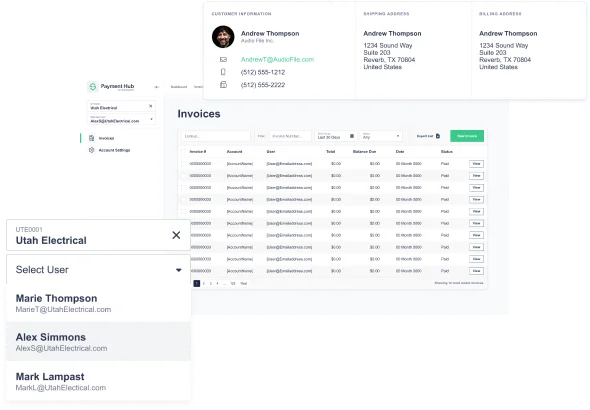
Customer payment portalA payment page for open invoices, on its own or embedded in your Sage CRM portal, on whichever gateway you choose.
ACH paymentsACH and eCheck sit beside cards on the same portal, and each payment posts to Sage 100 as an AR Receipt.
Lower card costs on commercial cards
Level 2 and Level 3 interchangePayment Hub sends line-item data from Sage 100 sales order and AR invoice detail on any of its 19+ gateways, so enhanced data isn't tied to one processor.
Visa CEDPVisa's Commercial Enhanced Data Program now decides whether those lines earn anything: on Visa's April 18, 2026 schedule, enhanced data that fails its unpublished checks is worth no more than none. The data comes from the real Sage 100 order and invoice lines, for every Company and warehouse.
Card cost controls
- COMMERCIAL CARDLevel III from sales order and AR invoice detail
- VISA CEDPLine-item data validated
- DEBIT CARDNever surcharged
Payment Hub vs Sage 100's native Credit Card Processing, honest side-by-side
Sage 100's Credit Card Processing module ships with the platform and runs on one Sage-certified gateway, such as Paya. Payment Hub is for Sage 100 customers who need more than one gateway, routing by Company and warehouse, surcharging, or a payment portal built for B2B.
| Capability | Native Sage 100 Credit Card Processing | Payment Hub on Sage 100 |
|---|---|---|
| Gateway / processor choice | ✗ Limited to Sage-certified gateways. Switching = re-do CC Processing config | ✓ 19+ gateways (Worldpay, Adyen, Fortis, PayTrace, Stripe, Authorize.Net, NMI, USAePay, plus Sage-certified gateways if you keep them) |
| Level III interchange enrichment | ✗ Level 2 and 3 data through the Sage-certified gateway (Paya, for example), on that one gateway | ✓ Auto-enriched from Sage 100 Sales Order Detail / AR Invoice Detail / Production Order line records, 20+ fields per transaction |
| Customer portal payment surface | ~ Limited via Sage CRM / eBusiness Manager. Basic payment via certified gateway | ✓ Modernized payment surface, multi-invoice batch pay, stored credentials, ACH, multi-currency, L3 |
| Multi-Company / multi-Warehouse routing | ~ Single-MID typical, multi-Company support varies | ✓ Per-Company / per-Warehouse routing, different MIDs, gateways, currencies, surcharging policies |
| Multi-invoice consolidation | ✗ Per-invoice flow | ✓ Batch pay across multiple invoices, single auth, single capture, line-level cash app |
| Surcharging / convenience fees | ✗ Not native | ✓ Compliant surcharging engine (per-state, per-card-brand, per-merchant rules) |
| Real-time line-level cash application | ~ Auto-apply on captures, line-level varies | ✓ Real-time line-level cash app via AR Receipt + line-level distribution via BOI |
| Manufacturing-edition patterns (BOM / MRP-driven) | ✗ Not native to CC Processing | ✓ Triggered by Sage 100 Production Management events, BOM-aware deposits, MRP-driven milestone billing |
| Sage CRM portal embedding | ~ Sage CRM portal renders. Payment via certified gateway | ✓ Embedded payment surface inside Sage CRM portal, gateway-agnostic flexibility |
| Dunning automation | ~ Sage Alerts & Workflow can drive reminders, not gateway-aware retry | ✓ Full dunning ladder with auto-retry, gateway-aware, configurable per Company / Warehouse |
| Custom Office / VBScript / panel respect | ✓ Native, CC Processing fires Sage 100 events | ✓ Same, Payment Hub-driven postings via BOI fire your existing VBScript / Custom Office events |
See it running against your own Sage 100 environment
A 30-minute walkthrough: BOI and Visual Integrator integration, AR Receipt cash application, multi-Company routing and BOM-driven deposits.
Beyond the Credit Card Processing module
Sage 100 runs small and mid-sized distributors and manufacturers, many on an installation that dates back to MAS 90. Its Credit Card Processing module, on a Sage-certified gateway such as Paya, already takes deposits in Sales Order and invoice payments in Accounts Receivable, vaults cards and sends Level 2 and 3 data. Integrating Payment Hub with Sage 100 keeps all of that, and adds:
Every ERP Payment Hub works with is on the ERP payment processing page.
Questions
Does Clarity Payment Hub integrate with Sage 100?
Yes. Clarity Payment Hub integrates with Sage 100 (formerly Sage ERP MAS 90 / 200 / 200 SQL) through Sage 100's published integration paths: the Business Object Interface (BOI) for COM-based programmatic access, Visual Integrator for ETL-style scheduled imports / exports, ODBC connectivity for direct database access (especially powerful on Sage 100 Premium with Microsoft SQL Server backbone), and the Sage 100 SDK for tighter integration scenarios.
Which Sage 100 editions does Payment Hub support?
All four. Sage 100 Standard (the on-premise edition with ProvideX file system), Payment Hub integrates via BOI, Visual Integrator, and ODBC. Sage 100 Advanced (multi-site / WAN deployment with thin-client architecture), same integration. Works across the LAN / WAN setup. Sage 100 Premium (Microsoft SQL Server backbone for scalability), same integration plus the option of direct SQL Server-side queries for higher-volume scenarios.
How is this different from Sage 100's native Credit Card Processing module?
Sage 100 ships with the Credit Card Processing module, typically configured to integrate with one of Sage's certified gateways (most often Paya, now part of Nuvei). It handles invoice payments, deposits and Level 3 data on that gateway. What it doesn't add is a choice of gateways, surcharging, or dunning beyond Sage 100's own statements.
Does Payment Hub respect Sage 100 customizations, Custom Office, Customizer, scripts, custom panels?
Yes. Sage 100 customers customize through Custom Office (form / panel customization), Customizer (UI personalization), VBScript scripting on customer / item / transaction events, and custom panels added through Sage 100's panel framework.
What's the implementation timeline for Sage 100?
A typical Payment Hub + Sage 100 integration goes live in 48 hours once Clarity receives Sage 100 test environment access (BOI integration credentials, ODBC connection details for read access, Visual Integrator scheduling permissions if needed for batch flows), gateway credentials, and your baseline routing configuration.