


Recurring payment processing for B2B invoices
Consumer subscriptions charge the same amount every month. B2B recurring payments usually follow invoices: a statement due on the 30th, a monthly retainer, an installment plan on a large order. Payment Hub runs them from the ERP's open invoices, so each charge applies to the invoice it pays.
- ACH auto-debit on the due date. A customer on Net 30 authorizes an ACH debit once, and it runs on each due date, with the NACHA authorization captured. See ACH payment processing.
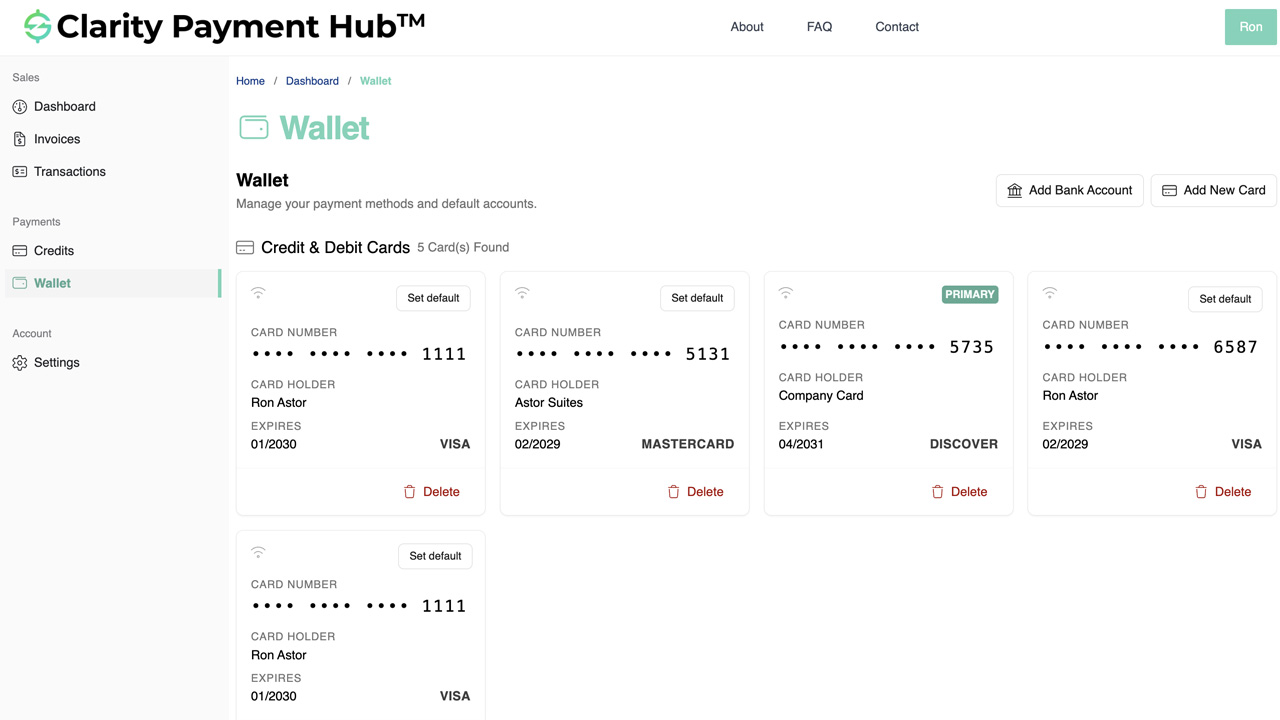
- Autopay and installment plans. Customers turn on autopay or a payment plan in the customer payment portal, and update their own card or bank account.
- Saved cards and bank accounts. Payment details are stored as tokens at the gateway, not in the ERP.
- Failed payments handled. A declined charge triggers retries and dunning reminders with a pay link, instead of a call from AR. See accounts receivable automation.
- Posted to the ERP. Every recurring charge posts as a payment against its invoice, in real time.
For card payments, the card networks treat these as stored-credential transactions: the first payment records the customer's consent and the network's transaction ID, and each later charge refers back to it. Done right, that helps approval rates on recurring charges; it doesn't change the interchange rate.
Selling consumer subscriptions online instead? See subscription eCommerce.
What Is a Recurring Payment?
A recurring payment, also known as a subscription, recurrent billing, or automatic payment (autopay), is an electronically delivered payment method that repeats on a set timetable.
Recurring payments automatically charge customers on a regular basis for things such as memberships, subscriptions, lessons, and services. To make recurring payments, customers must sign a one-time authorization form.
How Do You Set Up a Recurring Payment?
To set up a recurring payment, you’ll first need to collect some information from the customer. This includes their name, billing address, and credit card or payment information. The customer also needs to authorize the recurring payments, and you’ll need to have terms and conditions that include a cancellation policy for them to sign.
The automatic billing cycle for the recurring payment can be weekly, monthly, annually, or at another time interval of your choosing. You’ll want to pick something that makes sense for the product or service your client is paying for.
Once you have all the information, you can set up the recurring payment in your payment portal or accounting software.
The simplest approach to taking recurring payments is with an all-in-one payment processor that handles transactions while also providing billing software and security measures to safeguard your consumers' personal information.
Working out how this fits your setup?
Tell us how you take payments today and which gateway and ERP you run. We'll walk through what Payment Hub would change end-to-end, against a sandbox of your own system.
How Do Recurring Payments Work?
Whether you want to handle recurring payments with a subscription billing tool or a B2B invoicing solution, the basic procedures are similar: customers sign up for a subscription or recurrent billing invoice, and you charge them at regular intervals for the products or services you provide. You'll want to save the customer's payment information on file so that the charges can be handled automatically.
Recurring payments in your ERP
Scheduled charges land on different records in each ERP. Here is how they post in each one:
- Epicor Eclipse payment processing: contractors on autopay pay each statement from a saved account, posted to the right branch.
- Epicor Prophet 21 payment processing: plant customers on scheduled ACH for their monthly MRO statements.
- Epicor Eagle payment processing: autopay on the statement date and installment plans for charge accounts.
- Epicor Kinetic payment processing: scheduled payments against Kinetic AR invoices for each company.
- Epicor E10 payment processing: ACH auto-debit on the due date for Net 30 customers, posted to ARInvoice.
- Infor SyteLine payment processing: milestone and project invoices charged on schedule to a saved method.
- SYSPRO payment processing: autopay posted as AR receipts in each SYSPRO Company.
- Sage 100 payment processing: scheduled payments posted to AR in Sage 100, on whichever gateway you choose.
- NetSuite payment processing: recurring charges on NetSuite invoices from a saved card or bank account.
- Sage Intacct payment processing: subscription billing runs with dunning set per contract.
- Acumatica payment processing: payment plans on Acumatica invoices, charged branch by branch.
- Business Central payment processing: automatic charges on posted sales invoices from the card on file.
- Dynamics GP payment processing: autopay set up once and carried over when you move off GP.
- Dynamics 365 Finance payment processing: scheduled charges per legal entity, posted as customer payment journal lines.
- Odoo payment processing: recurring charges reconciled against Odoo invoices automatically.
- Sage 300 payment processing: scheduled payments in each customer's currency.
- Sage X3 payment processing: recurring charges per site, with each legislation's tax.
- SAP Business One payment processing: down payment and installment invoices charged on schedule.
- SAP S/4HANA payment processing: scheduled charges on open items for each Company Code.
- Dynamics NAV payment processing: autopay on open customer ledger entries, carried over to Business Central.
All 25 ERP integrations are on the Payment Hub integrations page.
Still have questions? Chat with us on the bottom right corner of your screen.
FAQ
How can recurring billing handle failed payments?
Recurring billing can address failed payments by implementing automated retry processes. When a payment fails, the system should automatically attempt the transaction again after a designated interval. If the retry is successful, the payment is processed. If not, the system can notify the customer about the failed transaction, offering them a chance to update their payment information.
Providing clear instructions on how to rectify the issue with automated payments and ensuring open communication can help minimize customer frustration. Additionally, businesses should have a well-defined process for handling repeated failures, including suspending services or subscriptions if necessary, while still maintaining a customer-friendly approach to resolving the situation.
What are the different types of recurring payments available?
Subscription billing: This type of recurring payment is typically used for products or services that are delivered on a regular basis, such as magazines, software as a service (SaaS), or gym memberships. The customer is charged a set amount on a regular basis (e.g. monthly or annually) until they cancel their subscription services. Automatic billing: This type of recurring payment is used for ongoing services or products that are delivered on a regular basis, such as utility bills, rent, or car payments. The customer's payment method is automatically charged on a set schedule. Installment billing: This type of recurring payment is used when a large purchase is divided into smaller payments over a set period of time. The customer is charged a fixed amount on a regular basis until the purchase is paid in full. Donations: This type of recurring payment is used for charities and non-profits that rely on regular donations from supporters. Donors can set up a recurring payment to contribute a set amount on a regular basis. Retainer payments: This type of recurring payment is used in service-based industries, where clients pay a regular fee to retain the services of a professional, such as a lawyer or consultant.
What considerations should small businesses have for implementing recurring billing?
Small businesses should choose a reliable payment gateway, clearly communicate billing terms, offer flexible subscription plans, and establish a system for handling failed payments. It's crucial to ensure customer consent, provide easy cancellation options, and prioritize data security when you accept recurring payments.
Additionally, monitoring payment trends, addressing customer inquiries promptly, and staying updated on relevant regulations are essential for the successful implementation of recurring payments. You don't want to implement a policy of recurring billing that will upset customers, and you certainly don't want your recurring payment model to get you in legal trouble.
Related resources

Autumn Spriggle
Autumn Spriggle is a Content Writer at Clarity Ventures who stays up to date on the latest trends in eCommerce, software development, and related topics to provide readers with the latest and greatest. She strives to help people like you realize the full potential for their eCommerce business.